ShotGlass alternative: Screen Records vs ShotGlass
ShotGlass makes 3D product shots. Screen Records makes videos you narrate, with captions on your Mac, a camera and an AI agent that edits them.
ShotGlass and Screen Records are two of the few Mac screen recorders sold for a one-time price by a solo developer. ShotGlass starts at $29 and Screen Records at $29. Both keep your recordings on your Mac, both zoom toward your clicks and smooth the cursor, and both let an AI agent like Claude Code drive the app over MCP. The difference is the video each one is built to make. ShotGlass makes product shots that look like an Apple ad. Screen Records makes videos where you talk: tutorials, courses, demos with a camera and captions.
Everything below about ShotGlass was read off its own website, shotglass.app, on November 18, 2026. Its system requirements come from an iThinkDifferent review from June, because the site does not list them. Everything about Screen Records describes version 0.1.9, released November 10, 2026. ShotGlass is in beta and ships often, so check its page before you buy.
The short version
Choose ShotGlass if the video is a launch clip or a landing-page loop and you want it to look like a commercial: your recording on a 3D MacBook, a simulated camera lens, transitions that move between 2D and 3D. It also takes screenshots and annotates them in the same app. $29 once for one Mac, with a year of updates.
Choose Screen Records if you narrate, show your face, or teach. It captions on your Mac, cuts every pause in one pass, lets you re-record a sentence in your own voice, and changes the camera layout across the timeline. Exports are free with a small corner badge, so you can finish a whole video before you pay. $29 once for one Mac at the current price, with updates for life.
If you are torn, ask what the viewer looks at. If it is the product, ShotGlass. If it is you explaining the product, Screen Records.
What the two apps share
The overlap is bigger than the marketing suggests:
- Local recording and editing. Neither uploads your recordings. Neither has share links.
- Automatic zoom. ShotGlass zooms toward on-screen actions after recording. Screen Records has a Zoom on clicks switch that places a zoom on each click and holds it while you type. Both let you drag zooms on the timeline or add your own.
- A cursor recorded separately, so its size and smoothing can change after the take.
- Camera, microphone and system audio in the same recording.
- Backgrounds and padding around the recording, and text and images over it.
- An MCP server inside the app that works with Claude Code, Claude Desktop, ChatGPT and Codex. In both, the app has to stay open while the agent works.
Where ShotGlass is the better fit
- 3D scenes. It drops the recording onto a 3D laptop with a simulated lens and moves between 2D and 3D shots. Screen Records has flat backgrounds only, and nothing like this.
- Screenshots and annotation. Arrows, text and screenshots live in the same app as the recorder. Screen Records records video only.
- Several windows at once. ShotGlass records multiple windows and lets you rearrange them in the editor afterwards. It also mixes several cameras and microphones.
- One-click scene transitions. Screen Records cuts from one clip to the next.
- No telemetry at all. ShotGlass says the app collects no usage data. Screen Records has shared anonymous usage counts since 0.1.9 (recordings made, features used, never the recordings), and you can turn that off in Settings.
- Older macOS. ShotGlass runs on macOS 13. Screen Records needs macOS 14.
If the clip goes on a landing page with no voice, the 3D look will do more for it than captions ever will. Pick ShotGlass.
Where Screen Records is the better fit
Videos where you talk
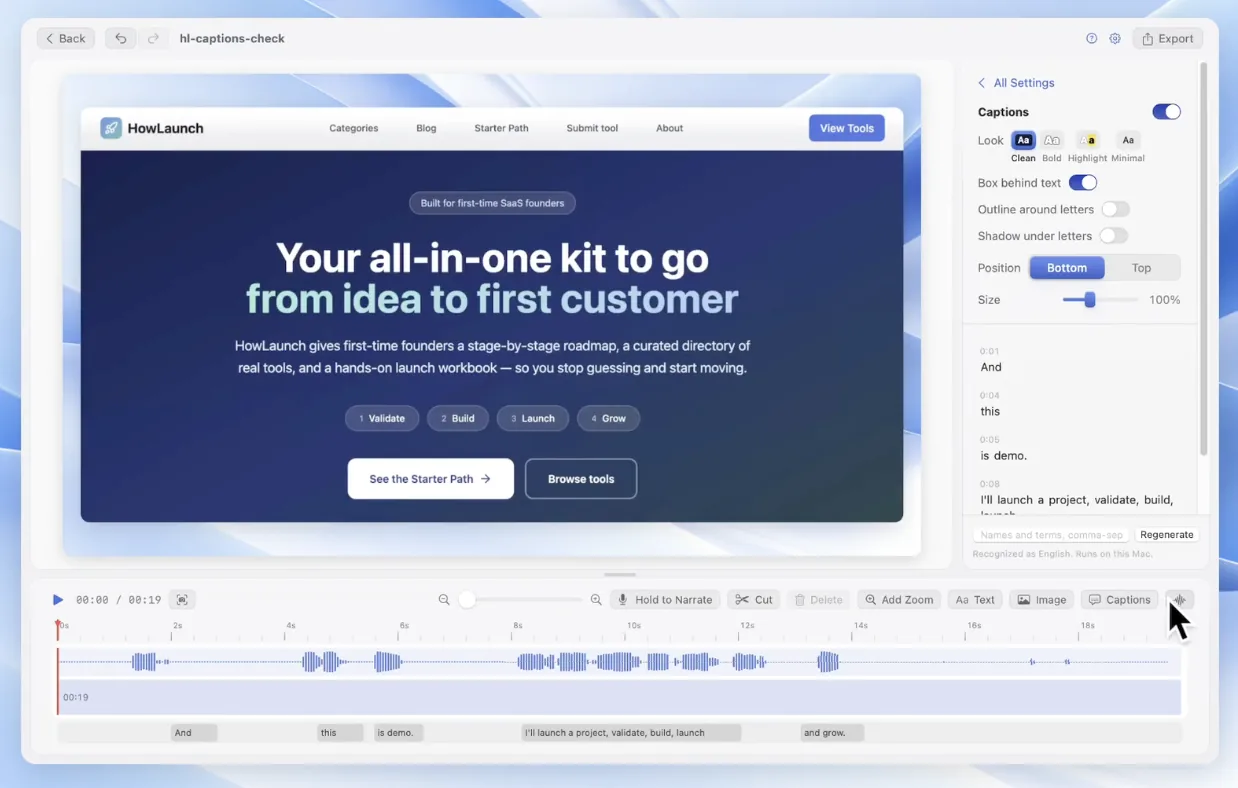
ShotGlass lists subtitles among its annotations but does not say whether it transcribes your voice. Screen Records does, with a Whisper model on your Mac: 4 caption styles, burned in or exported as SRT, WebVTT or plain text. Remove Pauses cuts every silence longer than a length you pick. If you fluff a sentence, mute that stretch and hold to narrate it again over the same footage, and the captions update to the new words. Details are on the captions page.
A camera that changes across the video
Full screen for the hook, a bubble in the corner for the demo, stacked under the screen for a vertical Reel, hidden for the part where your face adds nothing. Each layout covers a stretch of the timeline. A teleprompter panel sits under your camera while you record and never shows in the video, which is handy for courses with a script.
An agent that does the whole edit
Both apps let an agent record, trim, place zooms and export. Screen Records' MCP server goes further into the edit: the agent reads the transcript, cuts single words and pauses, adds captions, puts text, images or video over the recording, switches camera layouts, mutes a stretch of audio and changes the style. When it records a demo, it marks each step, and the automatic zooms land on the clicks it made. You watch every change in the editor, and each one is a single undo step. Setup is on the MCP page.
Hiding what should stay private
Draw a blur box over an email, an API key or a customer name, and it stays on through zooms. ShotGlass hides a cluttered desktop with a new background, but its site lists no blur.
Export before you pay, and keep the updates
ShotGlass is free to try, and its site says you pay when you are ready to export. Screen Records exports video and GIF for free with no limit, with a small badge in the corner that a license removes. AI editing and audio or caption file exports come with the license.
ShotGlass's $29 includes one year of updates. Screen Records' $29 includes all future updates. Its price rises in steps as licenses sell, and the full ladder is on the pricing page.
Formats for social
Vertical, square and 3:4 Reel formats, GIF export, and an estimate of export time and file size before you start. ShotGlass offers export presets for social media and the web, and its site does not mention GIF.
Pricing and platform
| Screen Records | ShotGlass | |
|---|---|---|
| Payment model | One-time license | One-time license (Personal); yearly per seat (Team) |
| Starting price | $29 for 1 Mac (current price) | $29 for 1 device |
| More Macs | $49 once for 3 Macs | Team: $39 per seat per year, up to 3 Macs |
| Who can use it | Any license: personal or commercial work, at a company of any size; the 3 Macs can be a colleague's or a family member's | Personal: personal use and businesses of up to 2 people; Family Sharing for up to 6 family members |
| Updates | For life | 1 year |
| Free use | Record, edit and export video and GIF with no limit; small corner badge | Free to try; pay to export |
| Captions from your voice | Yes, on your Mac | Not listed |
| 3D scenes | No | Yes |
| Screenshots | No | Yes, with annotation |
| AI agent over MCP | Record, cut words and pauses, zoom, caption, overlays, camera layouts, export | Record, screenshot, trim, zoom, export |
| Usage data | Anonymous counts, can be turned off | None |
| Refunds | 14 days, no reason needed (policy) | 7 days, no questions asked |
| macOS | 14+; Apple Silicon only | 13+; Apple Silicon only |
| Version compared | 0.1.9 | Beta, November 2026 |
Questions about ShotGlass
Is ShotGlass a one-time purchase?
The Personal license is: $29 once for one Mac, with one year of updates. The Team plan is $39 per seat per year.
Does ShotGlass make captions from your voice?
Its site lists subtitles among its annotations but does not say whether it transcribes your voice.
What is a ShotGlass alternative for narrated videos?
Screen Records. It captions your voice on your Mac, cuts every pause in one pass, lets you re-record a sentence and changes the camera layout across the video, for $29 once.
Which macOS does ShotGlass need?
macOS 13 or later on Apple Silicon, according to an iThinkDifferent review from June.
What to try before deciding
Record the same two-minute demo in both. Talk through it, make one mistake in the middle, and export it for the place you will post it. If you spent the edit wishing for captions and a cleaner take, keep Screen Records. If you spent it wishing the product looked more expensive, keep ShotGlass.
Screen Records is free to download, and you can export the finished test video without paying.
Share this comparison
Keep reading
- ComparisonStop paying monthly for every step of a screen recordingRecorder, editor, captions, silence cutting and GIF export in one Mac app, paid once. What the usual subscriptions cost and what this does not replace.
- ComparisonFree screen recorders for Mac with no watermarkWhich Mac screen recorders are free with no watermark, which are trials or capped plans, and a 60-second test to run before you record a real take.
- GuideAsk your AI agent to install Screen RecordsClaude Code or Codex can install the app from a terminal. With a license and AI editing on, it then can record, edit and export videos on its own.